Sign In
Lightning Brain

Lightning Brain

We Watch the Park While You Play!

🐌 New in 1.0.17: Meet The Snail
Download on the App Store

Disney's posted wait times run long. Lightning Brain's Real Wait Times (Beta) shows you the wait you'll actually have, right on every ride. Plus live waits for all four parks, smart routing between your Lightning Lanes, and alerts the instant a deal emerges.

Generous free tier saves the average user up to 92 minutes a day.
Premium users save an average of 128 minutes in line!

Open Your Free Account

βœ“ Free forever, no subscription    βœ“ First Premium day free    βœ“ Works with Disney's apps

🐌 NEW IN 1.0.17 · FREE FOR EVERYONE DURING THE BETA

Real Wait Times and The Snailometer (Beta)

Real Wait Times (Beta)

We all know the posted waits are a guess. We dug into how far off they run in our deep dive on wait time inflation.

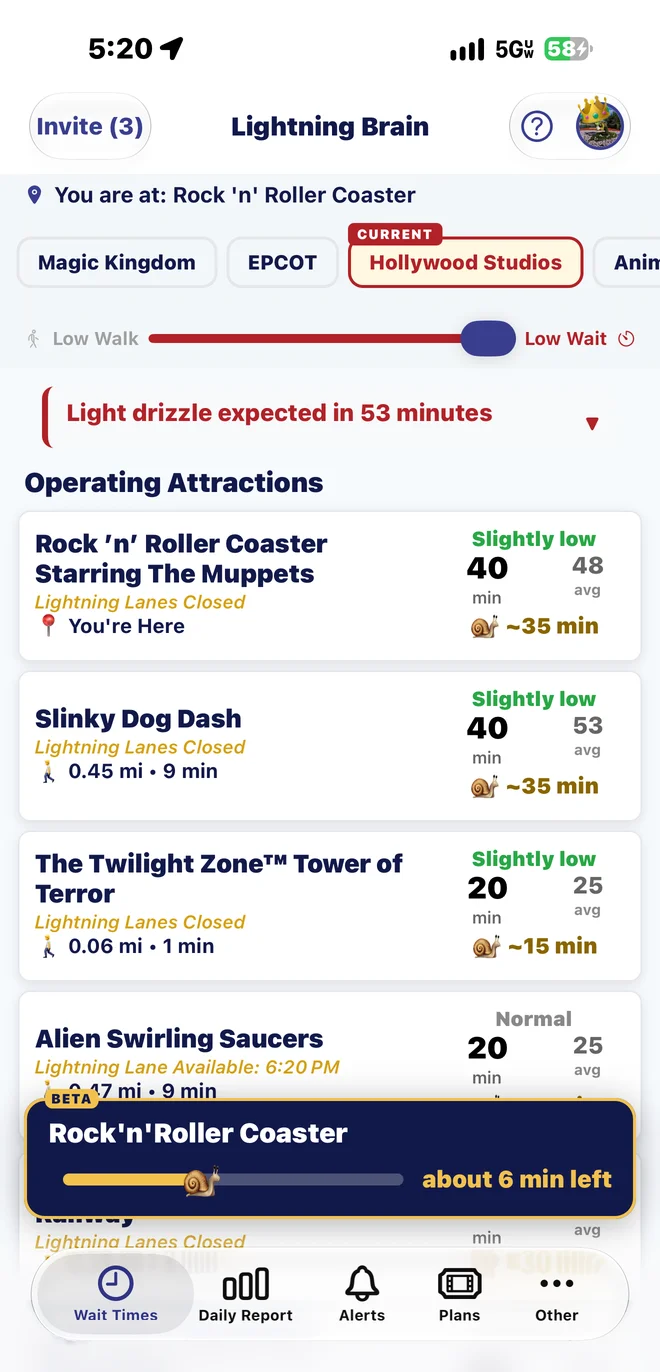
Our new Real Wait Times model (Beta) predicts the actual time you'll wait in any queue. It shows that number on each ride, right next to The Snail.

Lightning Brain wait list showing posted waits with The Snail's Real Wait Times (Beta) beside each ride
The wait list with Real Wait Times (Beta) and The Snail on each ride.
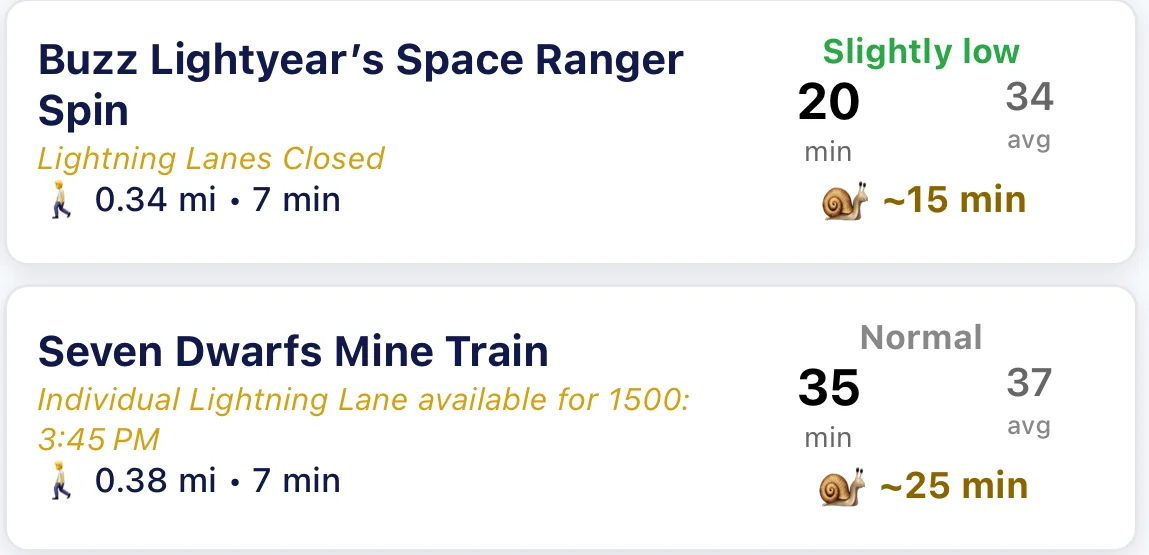
Real Wait Times (Beta) at Magic Kingdom: Buzz Lightyear's Space Ranger Spin posted 20 minutes with The Snail at about 15, and Seven Dwarfs Mine Train posted 35 with The Snail at about 25
Real Wait Times (Beta) at Magic Kingdom: Buzz posted 20, The Snail said about 15. Seven Dwarfs posted 35, The Snail said about 25.

The Snailometer (Beta)

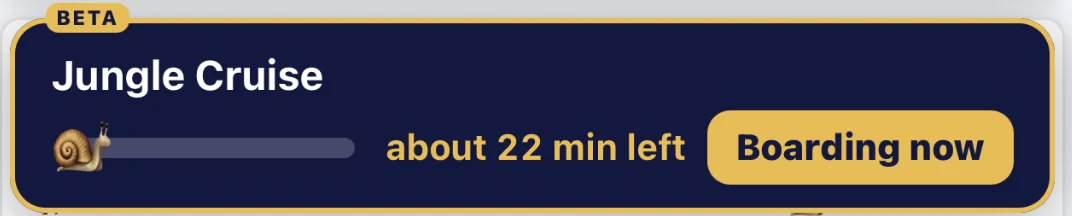
Once you're in line, switch on The Snailometer (Beta). The Snail moves along to show your progress and the time until you board, in real wait time, not the posted one.

It sits at the bottom of the app and on your lock screen, so one glance shows where you stand.

The Snailometer (Beta) in line for Jungle Cruise: about 22 minutes left, with a Boarding now button
The Snailometer (Beta) in line for Jungle Cruise: about 22 minutes left, with the Boarding now button ready.
'What does the snail say?' was the repeated question! ... By the end of the day, I realized I was using Lightning Brain fully instead of the Disney app.
Heather Elias, Loudoun County, VA

The Snail is slow so that you are fast!

πŸ‘‘ MAXIMIZE YOUR DAY

Premium: The Decision Engine

Everything below is unlocked for $8.99 per day. Your first one is free.

πŸ—ΊοΈ

Smart Routing: "On the Way" Mode

Headed to your next booking? On the Way mode shows what you have time for between here and there. "Your Jungle Cruise window ends in 40 minutes. Pirates is on the way with a 10-minute wait. Tiana's would make you late."

πŸ“‹

Plan Tracking

Load your Lightning Lanes, dining, and Enchanted Extras by hand or from a Disney World app screenshot. Push notifications keep you on track and on time.

⚑

Lightning Lane Tracking

Tracks Lightning Lane availability so you know what's still bookable and when return times are slipping away.

🌦️

Weather Alerts & Re-Routing

Minute-by-minute rain alerts before it's on your face. Indoor attractions suggested first, and recommendations adapt when rides close for weather.

πŸ“Š

Crowd Analytics

Historical crowd data and real-time intelligence show you when parks are busiest and best times to visit.

πŸ“Έ

Premium Share Card Designs

Park and event designs for your Share Card, plus limited-time collectibles for festivals and special events. Add Premium to a past park day to unlock them there too.

Premium Alerts: Put Your Phone Away

Lightning Brain watches the whole park for you in real time. The moment something you care about changes, your phone buzzes.

πŸ“‰

Queue Drops

Seven Dwarfs just fell to 20 minutes, and every phone in the park saw it too. Worth the stampede? Lightning Brain is constantly watching and pings you the second a queue deal emerges, AND predicts how long it will last.

🎒

Ride Status & Wait Changes

Know the moment a ride goes down or comes back up, and when waits move on the attractions you care about. Filtered to your preferences, and it skips rides you've already done today.

⚑

Lightning Lane Windows

Your window opens in five minutes. Or it closes in ten and you haven't scanned in yet. Loaded straight from your plans and delivered at exactly the right moment.

🎟️

Virtual Queue Boarding

Know when your boarding group's call is approaching, and stay on time when the call happens. No need to watch the Disney app.

πŸ’²

Lightning Lane Availability

Slinky Dog sold out by 9am, but Disney releases new availability periodically all day. The instant a sold-out Lightning Lane comes back, you know, and the ride that's been eluding you is yours.

🌧️

Rain, Minute by Minute

A thunderstorm is fifteen minutes out, so get inside. The rain is about to end, so be first in line for rides that are still closed.

Pick your parks and topics each morning, then put your phone in your pocket and be with your family. Lightning Brain taps you on the shoulder when it matters.

🎁 ALWAYS FREE

Free: The Dashboard

Yours forever. Live park data and personal tools, no purchase required.

⏱️

Live Wait Times & Ride Status

Wait times and ride statuses across all four parks, updated in real time. Outages tracked as they happen.

βš–οΈ

Walk vs Wait Balance

Tired feet? Prioritize nearby attractions. Hate long lines? Find short waits even if farther. You control the balance.

πŸ•

Park Hours, Shows & Dining

Park hours, showtimes, and dining wait times in one place, right alongside the rides.

🎑

Park Hop Advisor

One glance sums up how busy each of the four parks is right now, so you know whether to hop and where to go.

πŸ‘Ÿ

Steps & Miles Counter, Queue Timer

Record the brag-details of your magical day. The miles and steps you cover feed your daily Share Card, and the queue timer records your actual waits.

🌀️

Weather Basics

Current conditions and the day's forecast for the parks, right on the dashboard.

πŸ“Έ

Daily Report & Share Card

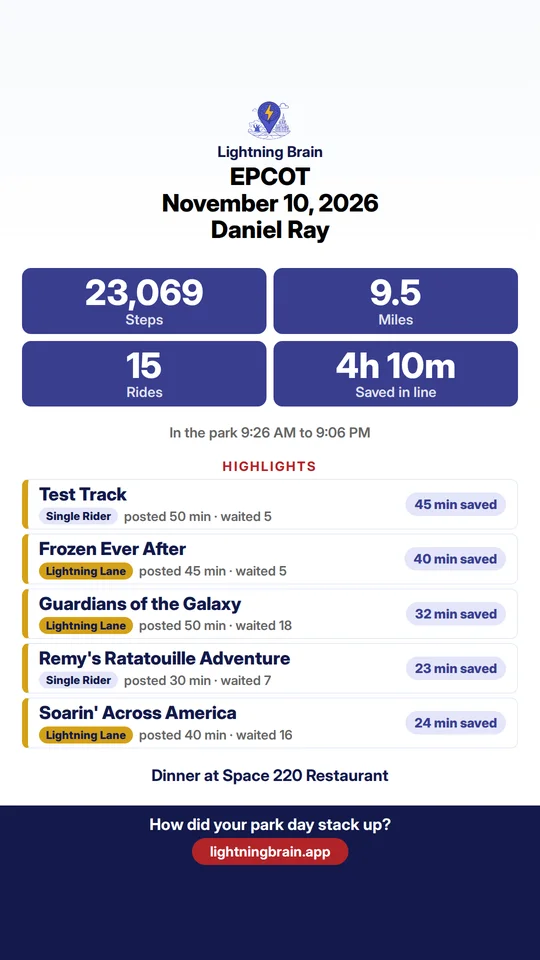
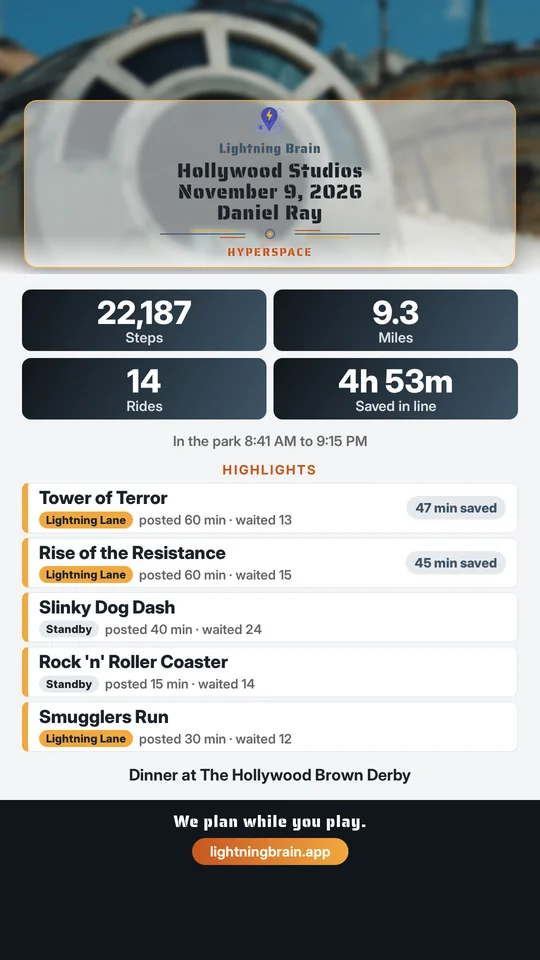
A daily, customizable Share Card with one-tap posting to your socials. It shows your Key Fun Indicators: steps, miles, rides, and time saved off posted waits. Been to the parks lately? Your past park days are already waiting.

πŸ“²

Lock Screen Widget

Your top attractions at a glance, right on your lock screen. Current waits and status without even opening the app. The Snailometer (Beta) rides there too, with its buttons, and Beta features are free for everyone during the Beta.

The free default Share Card for an example EPCOT day
Free default design
The Premium Hyperspace Share Card design for an example Hollywood Studios day
Premium Hyperspace design

How Smart Routing Saves You Hours

You're walking from Space Mountain to your next Lightning Lane at Haunted Mansion. You have 73 minutes. Lightning Brain weighed every wait time and walking path in the park and tells you: "You have time for Mad Tea Party (18 min total) or Winnie the Pooh (24 min total) on the way. Peter Pan would be cutting it too close."

That's the power of real-time intelligence. Lightning Brain knows your location, where you're going, live wait times, walking distances, and your personal walk vs wait preferences. Every recommendation is built around making the most of your time in the park, with less stress.

That's the decision engine: Lightning Brain Premium. Your first day is free.

Lightning Brain By the Numbers

7,551 min
Total Ride Wait Time Saved
Across All Lightning Brain Users
GOOD
92 min
Average Time Saved
Per Lightning Brain User Per Day
4
Walt Disney World
Parks Covered

Get the best experience on iOS

Download on the App Store

Why In-Park Apps Leave You Guessing (And How We Fix It)

😀 What's Wrong With Current Apps

  • Information overload without actionable insights
  • Rigid schedules that break when plans change
  • One-size-fits-all recommendations
  • Constant phone checking ruins family moments
  • Travel time ignored in routing
  • No "what's on the way" suggestions
  • Complex interfaces overwhelm visitors

⚑ The Lightning Brain Way

  • "Data Nerd" or "Next Right Thing" modes
  • Recommendations that adapt in real time as your day changes
  • Smart "on the way" routing
  • Personal recommendations based on YOUR walk vs wait priorities
  • Proactive alerts without constant phone checking
  • Weather-aware recommendations with intelligent re-routing
  • Clean, simple interface that just works

Families Love Lightning Brain

Real stories from Disney visitors who discovered the difference

Frequently Asked Questions

Everything you need to know about Lightning Brain

How is Lightning Brain different from the official Disney World app?

+

Disney's app is where you buy and manage Lightning Lanes. Lightning Brain is your companion once you're in the park: real-time intelligence, personalized routing, and alerts you can trust.

How accurate are Disney's posted wait times?

+

Posted waits are often a guess, and they often run long. Our deep dive on wait time inflation looks at how far off they run. Lightning Brain's Real Wait Times (Beta) predicts the wait you'll actually have and shows it next to The Snail.

Are Real Wait Times and the Snailometer (Beta) free?

+

Yes. Real Wait Times and the Snailometer are Beta features, free for everyone during the Beta. Your feedback taps, like Boarding now, make them smarter.

Do I still need the My Disney Experience app?

+

Yes! Use Disney's app to buy tickets, make dining reservations, and book Lightning Lanes. Lightning Brain enhances your experience with smarter recommendations, proactive alerts, and personalized routing that Disney's app doesn't provide.

Is Lightning Brain free?

+

The Lightning Brain dashboard is free forever: live wait times for four parks, walk vs wait sorting, the Park Hop Advisor, a queue timer, a lock screen widget, and the default Share Card. Real Wait Times (Beta) and the other Beta features are free for everyone during the Beta. Premium adds the decision engine for $8.99 per park day, and your first Premium day is free.

How much time does Lightning Brain save at Disney World?

+

Lightning Brain users save an average of 92 minutes of ride wait time per park day, and an average of 128 minutes on Lightning Brain Premium days.

How does smart routing save me time?

+

Lightning Brain analyzes your location, your next booking, and live wait data to show what you have time for "on the way." Example: "28 minutes until your Space Mountain window closes. Tomorrowland Speedway is on the way with a 10-minute wait, or PeopleMover at 5 minutes, but you don't have time for the 25-minute Buzz Lightyear line."

How does the "vacation days only" pricing work?

+

Pay only for days you're actually at Disney. Buy 1-7 days, no subscriptions. Your free account never expires, and your first Premium day is free.

How do Premium alerts work?

+

Lightning Brain watches the park in real time and buzzes your phone the moment something you care about changes: queue drops with a predicted deal duration, ride status changes, Lightning Lane windows, virtual queue boarding calls, and minute-by-minute rain alerts.

Can I get an alert when a sold-out Lightning Lane becomes available?

+

Yes. Disney releases new Lightning Lane availability periodically all day. Lightning Brain alerts you the instant a sold-out Lightning Lane comes back, so you can grab the ride that's been eluding you before the crowd notices.

Does Lightning Brain track virtual queue boarding groups?

+

Yes. It tells you when your boarding group's call is approaching and keeps you on time when the call happens, with no need to watch the Disney app.

What makes the "walk vs wait" balance special?

+

Tired feet? Prioritize nearby attractions. Hate lines? Find short waits even if they're farther away. You set the balance, and every recommendation respects it.

How current is the park data?

+

Wait times and ride statuses update in real time, and GPS updates continuously. You always see current conditions, though posted times may occasionally differ briefly from what's physically displayed at rides.

Does Lightning Brain work for all Disney World parks?

+

Yes! All four parks: Magic Kingdom, EPCOT, Hollywood Studios, and Animal Kingdom. Auto-detects which park you're in.

Is there an Android app?

+

Lightning Brain's app is on iPhone through the App Store. On Android, use the full Lightning Brain web app at lightningbrain.app in your phone's browser: same account, same Premium days.

Is Lightning Brain part of Disney's Lightning Lane?

+

No. Lightning Lane is Disney's paid line-skipping service, bought in the My Disney Experience app. Lightning Brain is an independent app from MouseTech Studios that helps you make the most of your Lightning Lanes, and is not affiliated with The Walt Disney Company. Lightning Brain Premium is our own paid tier and has nothing to do with Disney's Lightning Lane Premier Pass.

What is the Share Card?

+

The Share Card is a free default card of your park day: steps, miles, rides, and time saved off posted waits, shared in one tap. Premium days unlock park and event designs, including for past days.

Is my personal information secure?

+

Yes. Industry-standard encryption, never sold. GDPR and CCPA compliant.

Can I try Lightning Brain before my Disney trip?

+

Yes! Your free account never expires. Plus one free Premium day: use it to practice at home before your trip, or save it for the park.

Free Is the Dashboard.
Premium Is the Decision Engine.

Every account sees the park in real time. Premium tells you what to do about it. No subscriptions, no cancellations, pay only for days you're inside the gates.

Always Free

$0/forever

The dashboard, yours forever
All the live park data and personal tools. Never expires, no pressure to upgrade.

  • Live wait times & ride status, all four parks
  • Attractions sorted by your walk vs wait balance
  • Attraction filtering & personal preferences
  • Park Hop Advisor: how busy is each park?
  • Park hours, showtimes & dining waits
  • Real-time outage tracking
  • Basic weather information
  • Steps/miles counter & queue timer
  • Daily Report & Share Card (default design)
  • Lock screen widget for your top attractions

Also free for everyone during the Beta: Real Wait Times and the Snailometer.

Create Free Account

Your First Premium Day Is Free

Use it however you like: spend it at home learning the app and dialing in your preferences, or save it and make your first park day free. Your call, and your free account never expires either way.

Ready to Transform Your Disney Experience?

Your real-time companion inside the parks